What is DHIS2?
After reading this chapter you will be able to understand:
-
What is DHIS2 and what purpose it serves with respect to health information systems (HIS)?
-
What are the major technological considerations when it comes to deploying DHIS2, and what are the options for extending DHIS2 with new modules?
-
What is the difference between patient based and aggregate data?
-
What are some of the benefits and challenges with using Free and Open Source Software (FOSS) for HIS?
DHIS2 Background
DHIS2 is a tool for collection, validation, analysis, and presentation of aggregate and patient-based statistical data, tailored (but not limited) to integrated health information management activities. It is a generic tool rather than a pre-configured database application, with an open meta-data model and a flexible user interface that allows the user to design the contents of a specific information system without the need for programming. DHIS2 is a modular web-based software package built with free and open source Java frameworks.
DHIS2 is open source software released under the BSD license and can be obtained at no cost. It runs on any platform with a Java Runtime Environment (JRE 7 or higher) installed.
DHIS2 is developed by the Health Information Systems Programme (HISP) as an open and globally distributed process with developers currently in India, Vietnam, Tanzania, Ireland, and Norway. The development is coordinated by the University of Oslo with support from NORAD and other donors.
The DHIS2 software is used in more than 40 countries in Africa, Asia, and Latin America, and countries that have adopted DHIS2 as their nation-wide HIS software include Kenya, Tanzania, Uganda, Rwanda, Ghana, Liberia, and Bangladesh. A rapidly increasing number of countries and organisations are starting up new deployments.
The documentation provided herewith, will attempt to provide a comprehensive overview of the application. Given the abstract nature of the application, this manual will not serve as a complete step-by-step guide of how to use the application in each and every circumstance, but rather will seek to provide illustrations and examples of how DHIS2 can be implemented in a variety of situations through generalized examples.
Before implementing DHIS2 in a new setting, we highly recommend reading the DHIS2 Implementation Guide (a separate manual from this one), also available at the main DHIS2 website.
Key features and purpose of DHIS2
The key features and purpose of DHIS2 can be summarised as follows:
-
Provide a comprehensive data management solution based on data warehousing principles and a modular structure which can easily be customised to the different requirements of a management information system, supporting analysis at different levels of the organisational hierarchy.
-
Customisation and local adaptation through the user interface. No programming required to start using DHIS2 in a new setting (country, region, district etc.).
-
Provide data entry tools which can either be in the form of standard lists or tables, or can be customised to replicate paper forms.
-
Provide different kinds of tools for data validation and improvement of data quality.
-
Provide easy to use - one-click reports with charts and tables for selected indicators or summary reports using the design of the data collection tools. Allow for integration with popular external report design tools (e.g. JasperReports) to add more custom or advanced reports.
-
Flexible and dynamic (on-the-fly) data analysis in the analytics modules (i.e. GIS, PivotTables,Data Visualizer, Event reports, etc).
-
A user-specific dashboard for quick access to the relevant monitoring and evaluation tools including indicator charts and links to favourite reports, maps and other key resources in the system.
-
Easy to use user-interfaces for metadata management e.g. for adding/editing datasets or health facilities. No programming needed to set up the system in a new setting.
-
Functionality to design and modify calculated indicator formulas.
-
User management module for passwords, security, and fine-grained access control (user roles).
-
Messages can be sent to system users for feedback and notifications. Messages can also be delivered to email and SMS.
-
Users can share and discuss their data in charts and reports using Interpretations, enabling an active information-driven user community.
-
Functionalities of export-import of data and metadata, supporting synchronisation of offline installations as well as interoperability with other applications.
-
Using the DHIS2 Web-API , allow for integration with external software and extension of the core platform through the use of custom apps.
-
Further modules can be developed and integrated as per user needs, either as part of the DHIS2 portal user interface or a more loosely-coupled external application interacting through the DHIS2 Web-API.
In summary, DHIS2 provides a comprehensive HIS solution for the reporting and analysis needs of health information users at any level.
Use of DHIS2 in HIS: data collection, processing, interpretation, and analysis.
The wider context of HIS can be comprehensively described through the information cycle presented in Figure 1.1 below. The information cycle pictorially depicts the different components, stages and processes through which the data is collected, checked for quality, processed, analysed and used.
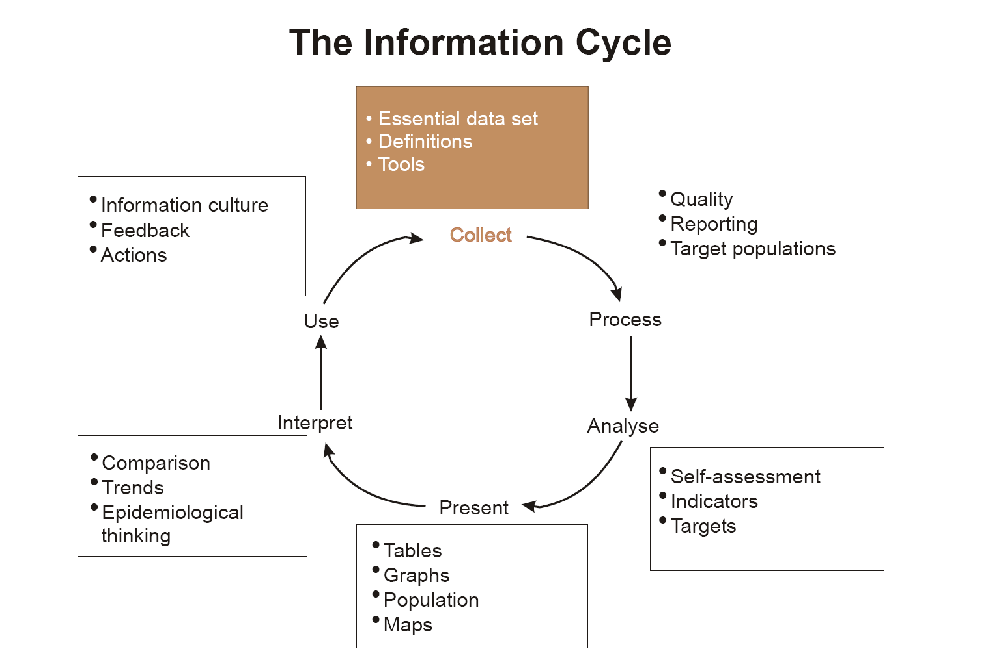
DHIS2 supports the different facets of the information cycle including:
-
Collecting data.
-
Running quality checks.
-
Data access at multiple levels.
-
Reporting.
-
Making graphs and maps and other forms of analysis.
-
Enabling comparison across time (for example, previous months) and space (for example, across facilities and districts).
-
See trends (displaying data in time series to see their min and max levels).
As a first step, DHIS2 serves as a data collection, recording and compilation tool, and all data (be it in numbers or text form) can be entered into it. Data entry can be done in lists of data elements or in customised user defined forms which can be developed to mimic paper based forms in order to ease the process of data entry.
As a next step, DHIS2 can be used to increase data quality. First, at the point of data entry, a check can be made to see if data falls within acceptable range levels of minimum and maximum values for any particular data element. Such checking, for example, can help to identify typing errors at the time of data entry. Further, user can define various validation rules, and DHIS2 can run the data through the validation rules to identify violations. These types of checks help to ensure that data entered into the system is of good quality from the start, and can be improved by the people who are most familiar with it.
When data has been entered and verified, DHIS2 can help to make different kinds of reports. The first kind are the routine reports that can be predefined, so that all those reports that need to be routine generated can be done on a click of a button. Further, DHIS2 can help in the generation of analytical reports through comparisons of for example indicators across facilities or over time. Graphs, maps, reports and health profiles are among the outputs that DHIS2 can produce, and these should routinely be produced, analysed, and acted upon by health managers.
Technical background
DHIS2 as a platform
DHIS2 can be perceived as a platform on several levels. First, the application database is designed ground-up with flexibility in mind. Data structures such as data elements, organisation units, forms and user roles can be defined completely freely through the application user interface. This makes it possible for the system to be adapted to a multitude of locale contexts and use-cases. We have seen that DHIS2 supports most major requirements for routine data capture and analysis emerging in country implementations. It also makes it possible for DHIS2 to serve as management system for domains such as logistics, labs and finance.
Second, due to the modular design of DHIS2 it can be extended with additional software modules or through custom apps. These software modules/apps can live side by side with the core modules of DHIS2 and can be integrated into the DHIS2 portal and menu system. This is a powerful feature as it makes it possible to extend the system with extra functionality when needed, typically for country specific requirements as earlier pointed out.
The downside of the software module extensibility is that it puts several constraints on the development process. The developers creating the extra functionality are limited to the DHIS2 technology in terms of programming language and software frameworks, in addition to the constraints put on the design of modules by the DHIS2 portal solution. Also, these modules must be included in the DHIS2 software when the software is built and deployed on the web server, not dynamically during run-time.
In order to overcome these limitations and achieve a looser coupling between the DHIS2 service layer and additional software artefacts, a REST-based API has been developed as part of DHIS2. This Web API complies with the rules of the REST architectural style. This implies that:
-
The Web API provides a navigable and machine-readable interface to the complete DHIS2 data model. For instance, one can access the full list of data elements, then navigate using the provided URL to a particular data element of interest, then navigate using the provided URL to the list of data sets which the data element is a member of.
-
(Meta) Data is accessed through a uniform interface (URLs) using plain HTTP requests. There are no fancy transport formats or protocols involved - just the well-tested, well-understood HTTP protocol which is the main building block of the Web today. This implies that third-party developers can develop software using the DHIS2 data model and data without knowing the DHIS2 specific technology or complying with the DHIS2 design constraints.
-
All data including meta-data, reports, maps and charts, known as resources in REST terminology, can be retrieved in most of the popular representation formats of the Web of today, such as XML, JSON, PDF and PNG. These formats are widely supported in applications and programming languages and gives third-party developers a wide range of implementation options.
Understanding platform independence
All computers have an Operating System (OS) to manage it and the programs running it. The operating system serves as the middle layer between the software application, such as DHIS2, and the hardware, such as the CPU and RAM. DHIS2 runs on the Java Virtual Machine, and can therefore run on any operating system which supports Java. Platform independence implies that the software application can run on ANY OS - Windows, Linux, Macintosh etc. DHIS2 is platform independent and thus can be used in many different contexts depending on the exact requirements of the operating system to be used.
Additionally, and perhaps most importantly, since DHIS2 is a browser-based application, the only real requirement to interact with the system is with a web browser. DHIS2 supports most web browsers, although currently either Google Chrome, Mozilla Firefox or Opera are recommended.
DHIS2 server hosting
Hosting DHIS2 on a national scale is a considerable undertaking which requires planning, provisioning, monitoring and management of potentially complex hardware and/or cloud resources. For a full discussion of the various tradeoffs of different approaches see the server hosting section of the DHIS2 implementation guide.
Difference between Aggregated and Patient data in a HIS
Patient data is data relating to a single patient, such as his/her diagnosis, name, age, earlier medical history etc. This data is typically based on a single patient-health care worker interaction. For instance, when a patient visits a health care clinic, a variety of details may be recorded, such as the patient's temperature, their weight, and various blood tests. Should this patient be diagnosed as having "Vitamin B 12 deficiency anaemia, unspecified" corresponding to ICD-10 code D51.9, this particular interaction might eventually get recorded as an instance of "Anaemia" in an aggregate based system. Patient based data is important when you want to track longitudinally the progress of a patient over time. For example, if we want to track how a patient is adhering to and responding to the process of TB treatment (typically taking place over 6-9 months), we would need patient based data.
Aggregated data is the consolidation of data relating to multiple patients, and therefore cannot be traced back to a specific patient. They are merely counts, such as incidences of Malaria, TB, or other diseases. Typically, the routine data that a health facility deals with is this kind of aggregated statistics, and is used for the generation of routine reports and indicators, and most importantly, strategic planning within the health system. Aggregate data cannot provide the type of detailed information which patient level data can, but is crucial for planning and guidance of the performance of health systems.
In between the two you have case-based data, or anonymous "patient" data. A lot of details can be collected about a specific health event without necessarily having to identify the patient it involved. Inpatient or outpatient visits, a new case of cholera, a maternal death etc. are common use-cases where one would like to collect a lot more detail that just adding to the total count of cases, or visits. This data is often collected in line-listing type of forms, or in more detailed audit forms. It is different from aggregate data in the sense that it contains many details about a specific event, whereas the aggregate data would count how many events of a certain type, e.g. how many outpatient visits with principal diagnosis "Malaria", or how many maternal deaths where the deceased did not attend ANC, or how many cholera outbreaks for children under 5 years. In DHIS2 this data is collected through programs of the type single event without registration.
Patient data is highly confidential and therefore must be protected so that no one other than doctors can get it. When in paper, it must be properly stored in a secure place. For computers, patient data needs secure systems with passwords, restrained access and audit logs.
Security concerns for aggregated data are not as crucial as for patient data, as it is usually impossible to identify a particular person to a aggregate statistic . However, data can still be misused and misinterpreted by others, and should not be distributed without adequate data dissemination policies in place.
Free and Open Source Software (FOSS): benefits and challenges
Software carries the instructions that tell a computer how to operate. The human authored and human readable form of those instructions is called source code. Before the computer can actually execute the instructions, the source code must be translated into a machine readable (binary) format, called the object code. All distributed software includes the object code, but FOSS makes the source code available as well.
Proprietary software owners license their copyrighted object code to a user, which allows the user to run the program. FOSS programs, on the other hand, license both the object and the source code, permitting the user to run, modify and possibly redistribute the programs. With access to the source code, the users have the freedom to run the program for any purpose, redistribute, probe, adapt, learn from, customise the software to suit their needs, and release improvements to the public for the good of the community. Hence, some FOSS is also known as free software, where “free” refers, first and foremost, to the above freedoms rather than in the monetary sense of the word.
Within the public health sector, FOSS can potentially have a range of benefits, including:
-
Lower costs as it does not involve paying for prohibitive license costs.
-
Given the information needs for the health sector are constantly changing and evolving, there is a need for the user to have the freedom to make the changes as per the user requirements. This is often limited in proprietary systems.
-
Access to source code to enable integration and interoperability. In the health sector interoperability between different software applications is becoming increasingly important, meaning enabling two or more systems to communicate metadata and data. This work is a lot easier, and sometimes dependent on the source code being available to the developers that create the integration. This availability is often not possible in the case of proprietary software. And when it is, it comes at a high cost and contractual obligations.
-
FOSS applications like DHIS2 typically are supported by a global network of developers, and thus have access to cutting edge research and development knowledge.